Multi-agent runtime — Beta

Talk once.
Ship a team.

A runtime for Claude Code and Codex CLI where the lead does the orchestration. No DAG. No YAML. No Kanban. Just a conversation.

npx @team-agent/installer@latest install
GitHub

Why Team Agent

Cross-lab ensemble

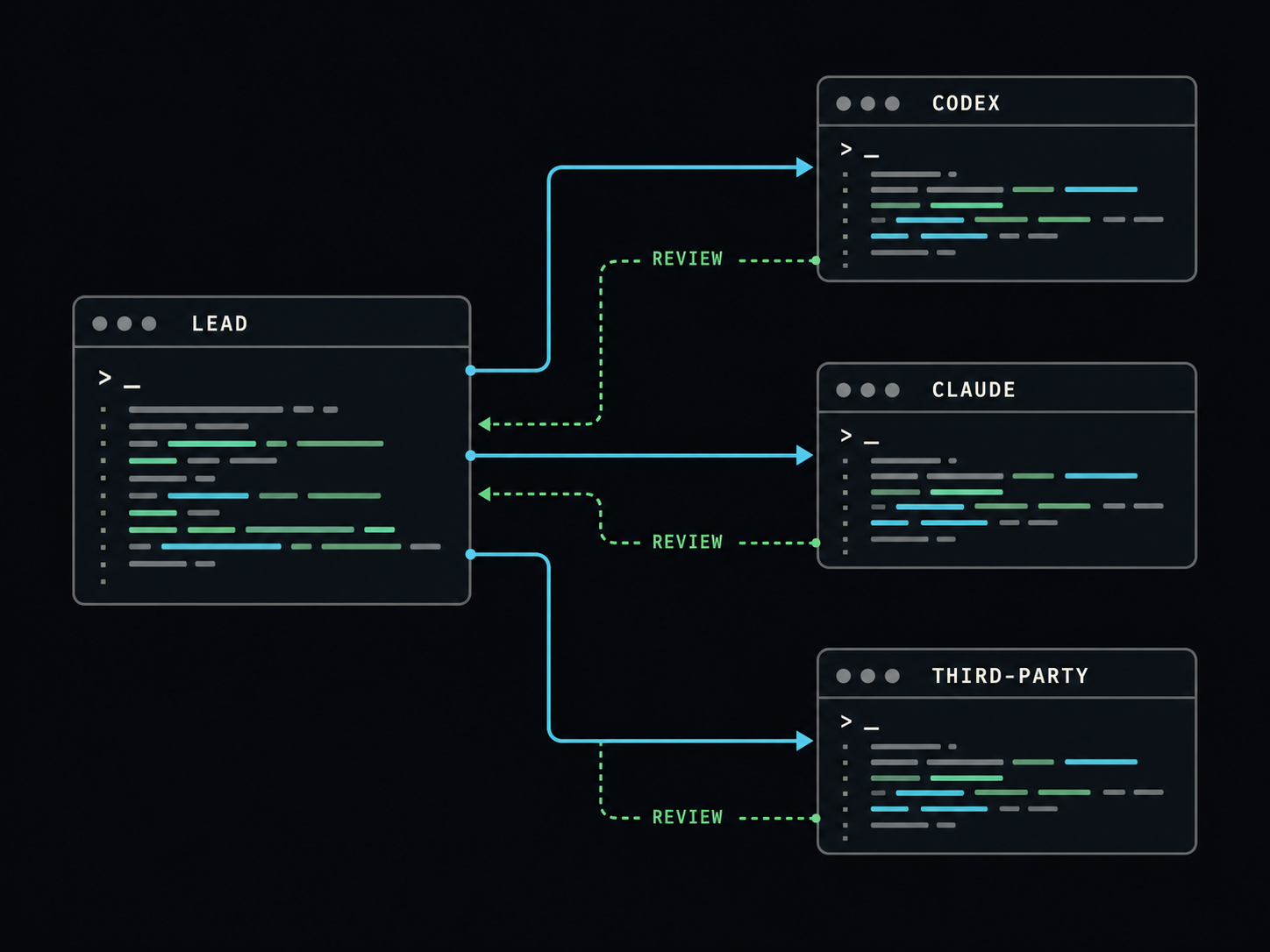
When every agent comes from the same vendor they share the same blind spots. Team Agent lets a Claude lead direct Codex workers — or vice versa — mixing providers per worker. A mistake that slips past one lab is often caught by the other. No single-vendor framework can offer this by business design.

Provider ensemble diagram: lead pane dispatches to Codex, Claude, and third-party worker panes with review arrows crossing back

Light orchestration

The lead is the Claude Code or Codex CLI session you are already in — not a special orchestrator agent with its own personality. No YAML required. The lead infers roles, assigns providers, and writes role docs from your description. Add a teammate mid-run or dissolve the team in the same conversation.

Schema-strict result envelopes

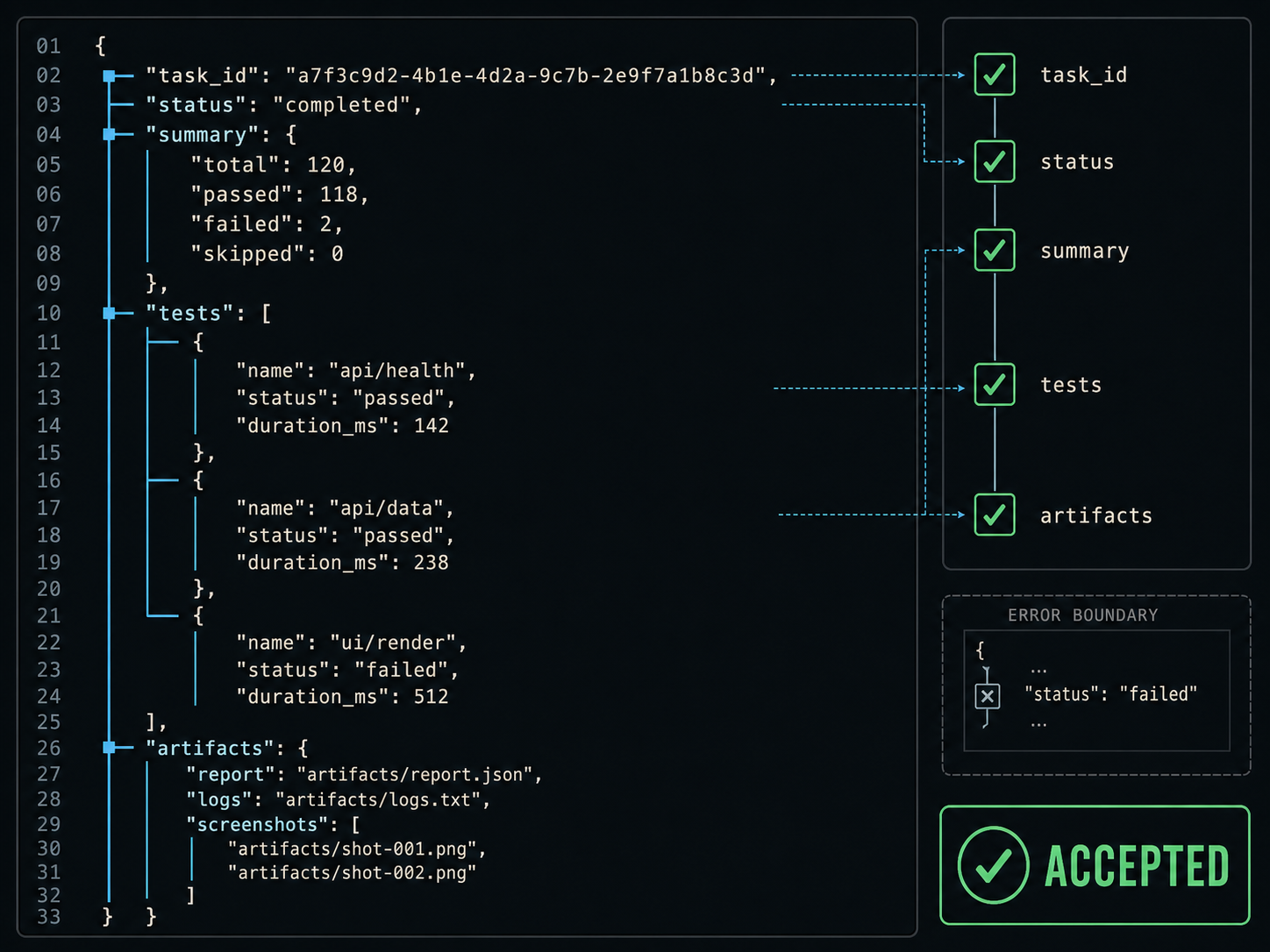
Workers report through JSON Schema-validated result_envelope_v1 objects — not free text. Every envelope carries status, changes, tests, risks, artifacts, and next_actions. Because all output is structurally identical, the lead can parse and reason over all worker results without reformatting.

Close-up of a JSON schema result envelope being validated with keys, checkmarks, and accepted stamp

Long-run robustness

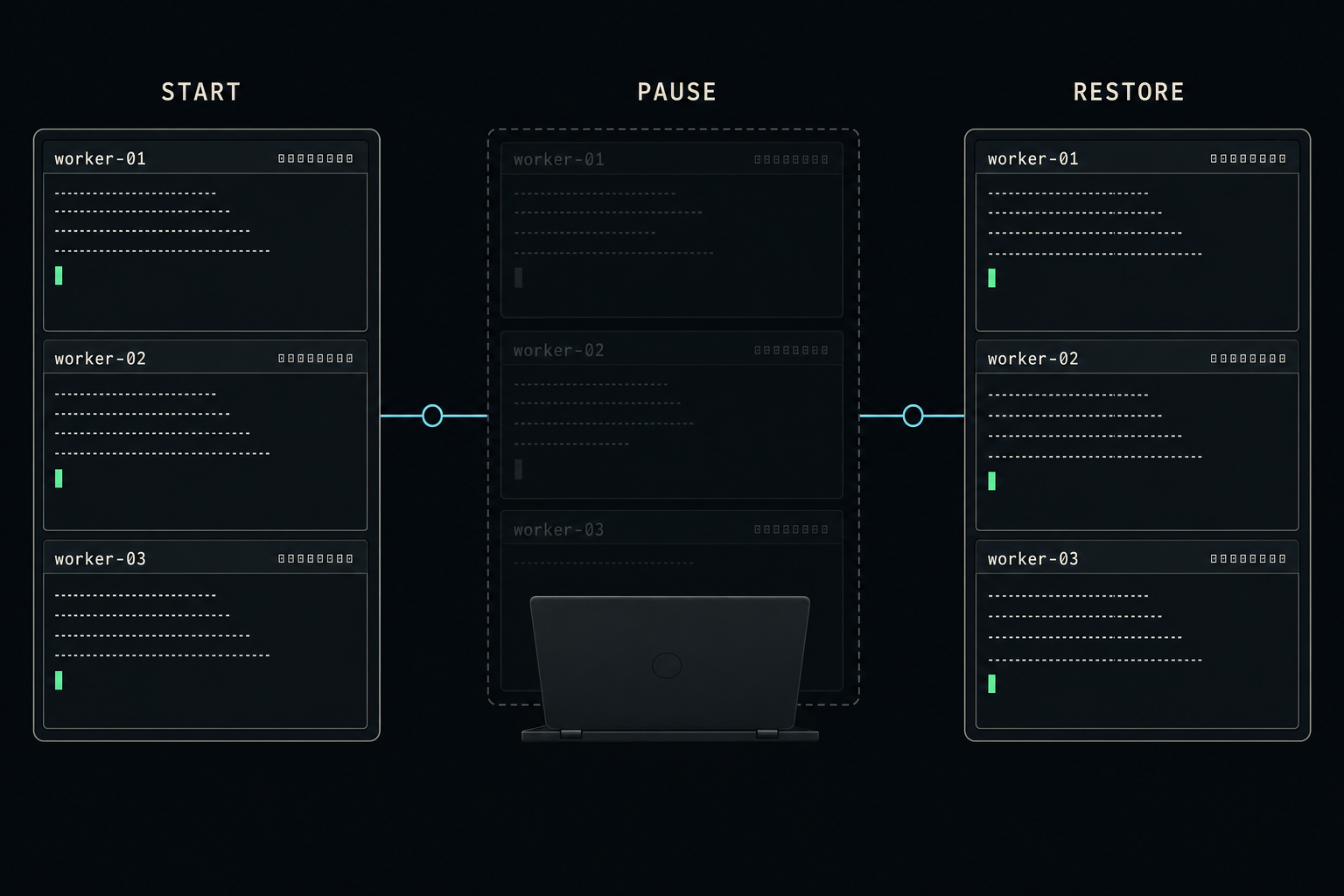
Workers run as long-lived processes with stable session IDs. A coordinator daemon runs per-workspace — closing your terminal does not stop it. If a pane dies the runtime detects it and can respawn without disrupting other workers. Come back the next day and run team-agent restart .; the team resumes from where it stopped.

Timeline of tmux panes persisting overnight: start, session pause, restored panes with same worker IDs

Bandwidth layering

You speak to the lead in plain, low-bandwidth language. The lead translates your goal into high-density professional prompts: explicit tool lists, permission modes, and output contracts. You never write a worker prompt. The lead's context policy (structured_only, 4000-token cap) keeps worker verbosity from overflowing the lead's context window.

How it works

Install once

Run the installer. It sets up the MCP server, registers the Team Agent skill, and wires into your Claude Code and Codex CLI config. Works across both providers from the same install.

Start the lead

Open a tmux-managed lead session. Workers need a concrete pane target to send verified messages back — the shortcut commands handle this automatically.

Describe the team you want

Tell the lead what to build. It proposes a team, waits for your confirmation, then spawns workers in separate terminal windows. Workers report back through schema-validated envelopes. You stay in one conversation.

Three design choices that make this possible

I

The orchestration layer is the lead. No external workflow engine. The lead reasons about role definitions, dispatches via MCP tools, and adjusts the team in real time from your conversation.

II

Transport is infrastructure, identity is persistent. Workers run as long-lived processes with stable session IDs. If a window dies the runtime respawns it — without that event entering any agent's context.

III

Standards over inventions. MCP for tool calls, Skill files for role definitions. Anything the broader ecosystem ships, this picks up automatically.

Examples

Real team-agent sessions. Click to expand.

Web development team 5 workers Claude + Codex SaaS build
You:   Build a small SaaS for tracking client feedback —
       backend, frontend, tests, and acceptance criteria.

Lead:  I'll use Claude for architecture and acceptance review,
       Codex for implementation and test writing.

       Proposed team:
         architect   (Claude)  — designs the system split
         backend     (Codex)   — API and data layer
         frontend    (Codex)   — UI components
         test-author (Codex)   — integration tests
         reviewer    (Claude)  — final acceptance

       Proceed?

You:   Go.

Lead:  Starting 5 workers...
       [architect] System design complete. 3 endpoints, 2 tables.
       [backend]   POST /feedback implemented. Tests: 4 passed.
       [frontend]  FeedbackForm component ready.
       [reviewer]  All acceptance criteria met.

       Result: success. Files in src/, tests in tests/.
       Ready for review.
Cost-optimized mixed team 2 workers Claude lead + Codex hands Low-credit mode
You:   I'm low on Claude credits. Use Codex for all the
       implementation tasks and keep Claude only for
       architecture review.

Lead:  Understood. Routing implementation and test tasks to
       Codex workers; keeping review tasks for Claude.

       Starting:
         implementer (Codex)  — all code changes
         reviewer    (Claude) — architecture + final sign-off

[implementer]: {
  "schema_version": "result_envelope_v1",
  "task_id": "task_impl",
  "agent_id": "codex_implementer",
  "status": "success",
  "summary": "Login endpoint implemented, 6 tests pass.",
  "changes": [
    {"path": "src/auth.py", "kind": "modified"},
    {"path": "tests/test_auth.py", "kind": "created"}
  ],
  "tests": [{"command": "pytest tests/", "status": "passed"}],
  "risks": []
}

Lead:  Implementation complete. Sending to reviewer.
       [reviewer] Architecture approved. Ready to merge.
Session close and next-day resume Persistent Long-run recovery
# Day 1 — end of session

You:   Close the team for now.

Lead:  Saving state, closing panes...
       [implementer] session saved: claude --resume sess_a3f9
       [test-author] session saved: codex resume sess_b8c1
       Done. ~2 seconds.

# Day 2 — terminal closed overnight, coordinator daemon persisted

You:   Continue yesterday's refactor team.

Lead:  Restoring 2 workers from saved sessions...
       [implementer] resumed: claude --resume sess_a3f9
       [test-author] resumed: codex resume sess_b8c1
       Both workers active. Same context as yesterday.

# From terminal directly:
$ team-agent restart .
$ team-agent status

  WORKER        PROVIDER   STATE    SESSION
  implementer   claude     RUNNING  sess_a3f9
  test-author   codex      RUNNING  sess_b8c1
Academic paper revision 5-stage pipeline Adversarial reviewers Non-coding team
You:   I need a thorough revision of this paper. I want
       adversarial reviewers — not ones that agree with me.

Lead:  5-stage pipeline. Proposed team:
         author       (Claude)  — original content
         reviewer-A   (Codex)   — adversarial critique
         reviewer-B   (Claude)  — independent critique
         arbitrator   (Claude)  — consensus resolution
         editor       (Codex)   — final revision pass

       Adversarial reviewers will flag every weak claim.
       Arbitrator resolves disagreements. Proceed?

You:   Yes.

[reviewer-A]: status: partial
  summary: Section 2 makes an unsupported causal claim.
           Methodology in §3 does not justify conclusion.
  risks: [{"severity": "high", "description": "Causal claim overstated"}]

[reviewer-B]: status: success
  summary: Structure sound. Section 2 claim needs citation.

Lead:  [arbitrator] Consensus: revise §2 claim, add citation.
       [editor] Applying revision...
       Done. Revised draft in artifacts/paper_v2.md

Blog

Case studies and updates.

All posts

Quickstart

1

Install

npx @team-agent/installer@latest install
2

Start the lead

team-agent claude   # or: team-agent codex
3

Describe your team

You: Build a SaaS for client feedback — backend, frontend, tests.
4

Check status or resume

team-agent status          # see all workers + health
team-agent restart .       # resume after terminal close
team-agent start-agent coder --workspace .   # repair one worker

Source install

git clone https://github.com/Florious95/team-agent.git team-agent
cd team-agent
npm exec --yes --package . -- team-agent-installer install

FAQ

Do I need to write YAML to use Team Agent?

No. The lead defines the team in conversation and generates TEAM.md and agents/*.md role docs from your description. YAML is an optional output — useful if you want to commit a reproducible team spec — but never required to get started. If you do write YAML, team.schema.json validates it at load time.

How is this different from Anthropic's built-in subagents?

Three differences: cross-vendor — Anthropic subagents spawn Claude workers only; Team Agent lets a Claude lead direct Codex workers so different labs' blind spots cancel out. Persistence — Anthropic subagents are scoped to a single request; Team Agent workers run as long-lived processes with stable session IDs that survive terminal restarts. Result envelopes — every Team Agent worker reports through a JSON Schema-validated object, not free text.

What happens if a worker crashes mid-run?

The coordinator daemon detects missing panes via health checks. Repair one worker with team-agent start-agent <agent_id> --workspace . without interrupting the rest. If you close the terminal, run team-agent restart . the next day — the runtime reads each worker's stored session ID and resumes. If a session ID cannot be verified, restart fails closed rather than silently spawning a blank worker.

Is Team Agent production-ready?

It is in beta. Verified across real workflows: cross-vendor web development teams, multi-stage academic paper revision, and adversarial game experiments. It works, but expect rough edges in less common configurations. Issues and pull requests are welcome on GitHub.

Why AGPL? Can I use it commercially?

AGPL-3.0-or-later is a community-first license: modifications you distribute must also be open-source. If you need to integrate Team Agent into a proprietary product without open-sourcing your modifications, a commercial license is available on request.

Copied